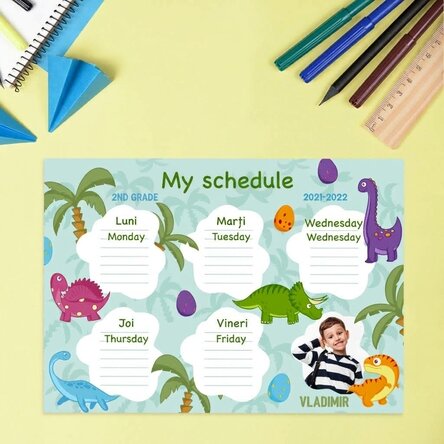
Personalised timetable with a photo and text - Jungle
Create the most original programme!
2.47 €
Product code: 12687
Product code: 12687


You might also be interested in ...




Newest products ...


Product description
The best way to keep track of all your school hours is to have a well-established and structured timetable that is as simple as possible. Why waste time creating a timetable when you can easily personalise one?
You can surprise your child with a personalised timetable with their name on it, and they will surely be delighted to create it in a neat or colourful way, perfect for displaying in a prominent place to remind them of their classes and activities.
What can I personalise?
The timetable can be personalised with a photo and text.
How can I personalise it?
Step 1: Click on the "Personalisation" button
Step 2: Click on the sample photo and then click on the green button at the bottom "Upload photos" (The images will be saved for future use)
Step 3: Select the photos from your computer, phone or tablet. The upload will start immediately.
Step 4: Choose a section of the product where you want to use the image.
Step 5: Choose the photo you want to appear in the selected section.
Step 6: If necessary, you can edit the photo by changing its position, zoom or rotation.
Step 7: When you are satisfied with the result, click on the "Confirm" button
. Step 8: Click on the sample text and edit the custom message.
Step 9: Once you have finished customising, click on the "Finish" button and add the product to your basket.
A4 format - 29.7 x 21 cm on 250g paper / 250g paper on magnetic sheet
A3 - 42 x 29.7 cm on 250g paper
You can surprise your child with a personalised timetable with their name on it, and they will surely be delighted to create it in a neat or colourful way, perfect for displaying in a prominent place to remind them of their classes and activities.
What can I personalise?
The timetable can be personalised with a photo and text.
How can I personalise it?
Step 1: Click on the "Personalisation" button
Step 2: Click on the sample photo and then click on the green button at the bottom "Upload photos" (The images will be saved for future use)
Step 3: Select the photos from your computer, phone or tablet. The upload will start immediately.
Step 4: Choose a section of the product where you want to use the image.
Step 5: Choose the photo you want to appear in the selected section.
Step 6: If necessary, you can edit the photo by changing its position, zoom or rotation.
Step 7: When you are satisfied with the result, click on the "Confirm" button
. Step 8: Click on the sample text and edit the custom message.
Step 9: Once you have finished customising, click on the "Finish" button and add the product to your basket.
A4 format - 29.7 x 21 cm on 250g paper / 250g paper on magnetic sheet
A3 - 42 x 29.7 cm on 250g paper
Reviews
Write a review
Reviews
Write a review
Verified buyer
Personalised timetable with a photo and text - Jungle
Pacat ca nu mai aveti magazin.Este destul de greu de ajuns la sediu daca nu vii cu masina.
Carmen, Romania
Verified buyer
Personalised timetable with a photo and text - Jungle
Calitatea produsului si rapiditatea livrarii
Ciprian Jipa, Romania
Verified buyer
Personalised timetable with a photo and text - Jungle
Comanda primita rapid si asa cum ma asteptam.
Cristina, Romania
Verified buyer
Personalised timetable with a photo and text - Jungle
Ușurința de a face și personaliza comanda, rapiditatea condectionarii cadourilor și mai multe opțiuni de livrare, toate rapide.
Simona Elena, Romania
Verified buyer
Personalised timetable with a photo and text - Jungle
StarGift la inaltime ca de obicei, servicii de calitate, livrare de exceptie!
Va multumesc.
BANICA VALERIA, Romania
Verified buyer
Personalised timetable with a photo and text - Jungle
Sunt client vechi si am fost frumos surprinsa de toate produsele.
Multumesc!
Simona, Romania